kiruthika
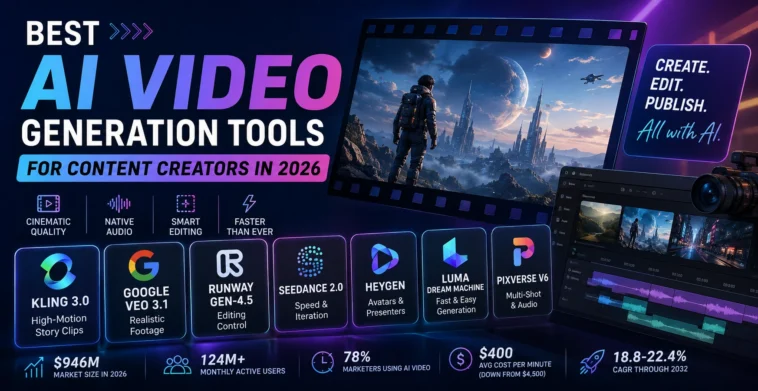
The best AI video generation tools in 2026 are Kling 3.0, Google Veo 3.1, Runway Gen-4.5, Seedance 2.0, HeyGen, and Luma Dream Machine, each built for a different job: fast social clips, cinematic marketing shots, precise editing control, avatar-led videos, or long-form consistency. There is no single “best” tool anymore. The right pick depends on your budget, your output (talking-head, product demo, or narrative short), and whether speed or polish matters more to you.
What Changed in AI Video Generation by 2026?
Twelve months ago, AI video was still a novelty full of warped hands and flickering faces. That has shifted. Native audio generation, multi-shot consistency, and rate-limited free tiers are now standard on the major platforms, and creators are testing 10 prompt variations in the time it used to take to test 3.
The market also consolidated hard. OpenAI shut down Sora’s consumer app in 2026 after reported compute losses of roughly $15 million a day, while Kling AI and Runway captured close to half of all platform revenue between them. Four names now effectively define the space: Kling on creator volume and revenue, Runway on valuation and professional workflows, Google Veo on distribution through YouTube, and Luma on capital raised per user.
Best AI Video Generation Tools 2026: Comparison Table
| Tool | Best For | Starting Price | Standout Feature |
| Kling 3.0 | High-motion, stylized story clips | Free tier + paid credits | ~85% usable-output rate in independent testing |
| Google Veo 3.1 | Realistic marketing concepts | Free (rate-limited) via AI Studio | Native ambient audio synced to visuals |
| Runway Gen-4.5 | Camera control + post-production editing | $15/month (125 free credits) | Generative editing alongside generation |
| Seedance 2.0 | Fastest turnaround for iteration | Free tier at launch | ~30-second generation for a 10-second clip |
| HeyGen | AI avatars, presenter-led videos | $29/month (Creator plan) | 700+ avatars, 175+ languages, voice cloning |
| Luma Dream Machine | Consumer-friendly quick generation | Free tier available | 30M+ users, strong mobile workflow |
| PixVerse V6 | Multi-shot generation with native audio | Free tier + paid plans | Repeatable output across text-to-video and image-to-video |
Pricing changes often on all of these platforms, so check the live pricing page before you commit a monthly budget.
Which AI Video Tool Actually Fits Your Work?
Kling 3.0: Best for Story-Driven, High-Motion Video
Kling handles fast movement and stylized scenes better than most competitors in current testing, and it has scaled to more than 60 million registered creators and roughly 600 million generated videos as of late 2025. If your content leans narrative or has a lot of camera movement, this is the current front-runner.
Google Veo 3.1: Best Free Option for Realistic Footage
Veo’s free access through Google AI Studio is rate-limited rather than credit-based, which suits creators making several short clips a day rather than a handful of long ones. Independent testers have called the built-in audio generation a genuine differentiator, since ambient sound syncs to the scene without manual editing. The trade-off is a hard 8-second cap per generation, so longer scenes need to be stitched together.
Runway Gen-4.5: Best for Editing Control
Runway remains the pick for creators and small teams who want generation and post-production editing in one place, including inpainting and consistent style transfer across clips. The learning curve is steeper than the others on this list, but the control it gives you is unmatched among mainstream tools.
Seedance 2.0: Best for Speed and Iteration
ByteDance’s Seedance 2.0 generates a 10-second clip in roughly 30 seconds, against 60 to 120 seconds for most competitors, and testers reported an 85% usable-output rate versus about 65% for Kling on the same prompts. If you iterate heavily on prompts before landing on a final cut, the time saved compounds fast.
HeyGen: Best for Avatars and Presenter Videos
HeyGen is not trying to compete on cinematic quality. It is built for talking-head content: product walkthroughs, multilingual explainers, and personalized outreach, without a camera or a presenter on call. With 700+ avatars and support for 175+ languages, it fits teams that need to scale presenter-led video across markets.
Luma Dream Machine: Best for Fast, Approachable Generation
Luma has built a large consumer base, over 30 million users, on ease of use rather than raw model power. It is a reasonable starting point for creators who want quick results without a steep setup process.
How Big Is the AI Video Generation Market in 2026?
The numbers vary by scope, but the direction is consistent across every research firm tracking it.
- The narrow, generation-only market is valued at roughly $847 million to $946 million in 2026, according to Fortune Business Insights and Grand View Research, up from about $716 to $789 million in 2025.
- Counting in adjacent categories like AI editing and captioning, some analysts put the broader 2026 market closer to $3.67 billion.
- Growth forecasts range from an 18.8% to 22.4% CAGR through the early 2030s, depending on which segments are included.
- Monthly active users across AI video platforms passed 124 million in January 2026.
- North America holds roughly 41% of global market share, ahead of Europe at 23.1% and Asia-Pacific at 20.9%.
- One market report tracking marketing adoption specifically found that 78% of marketing teams now use AI-generated video in at least one campaign per quarter, up from an estimated 35% just two years earlier.
- The same research put the average production timeline for a 60-second marketing video at 27 minutes with AI tools, down from roughly 13 days, with per-minute production costs falling from around $4,500 to about $400.
This is why the tooling conversation has shifted so fast: the cost and time barriers that used to keep AI video experimental are mostly gone for short-form content.
Which AI Video Generator Should You Choose?
- Making fast social clips on a budget? Start with Seedance 2.0 or Google Veo 3.1’s free tier.
- Building narrative or high-motion content? Kling 3.0 currently leads on usable output rate.
- Need editing control, not just generation? Runway Gen-4.5.
- Scaling presenter or product-demo videos? HeyGen.
- Running a workflow across multiple models? A multi-model platform saves you from juggling separate subscriptions and credit systems, at the cost of losing first access to brand-new model versions.
Whichever tool you pick, test it against your own use case before committing to a paid plan. The gap between “impressive demo” and “usable output for your niche” is still the main thing separating these tools in practice.
FAQs
Google Veo 3.1 through Google AI Studio is currently one of the strongest free options, since it is rate-limited rather than credit-capped, which suits creators generating several short clips a day.
Luma Dream Machine and PixVerse are generally the easiest to pick up, with straightforward prompt-to-video workflows and no steep editing learning curve.
Not fully. Tools like Runway add real editing control, but most AI generators still produce short clips (often 5 to 10 seconds) that need stitching, color matching, and sound design for a polished final video.
Entry-level paid plans typically start around $15 to $29 a month, with most platforms also offering a limited free tier or daily credit allowance for testing.
Increasingly, yes. Reported adoption already sits at 78% of marketing teams using AI video in at least one campaign per quarter, largely because production costs and timelines have dropped sharply compared to traditional video production.
Google Veo 3.1 stands out for native ambient audio that syncs automatically to the visual scene, without manual sound design.