kiruthika
Every small team eventually hits the same wall: too much to do, too few hands to do it. In 2026, the fix a lot of teams are reaching for isn’t “hire faster”, it’s a smarter stack of AI productivity apps that quietly take repetitive work off everyone’s plate.
Below, you’ll find tools worth evaluating this year, the research behind why they work, current pricing, and honest notes on where each one fits best, so you can build a stack sized for a 5-to-50-person team instead of an enterprise budget.
A quick note on the data: the figures below come from a mix of government surveys, market research firms, and vendor-commissioned studies, not peer-reviewed academic research. Methodologies and sample sizes vary a lot between sources, which is part of why estimates for the “same” thing (like hours saved per week) can differ. Where a number is a single vendor’s estimate rather than a broad consensus, that’s noted.
Why This Matters Right Now: The 2026 Data
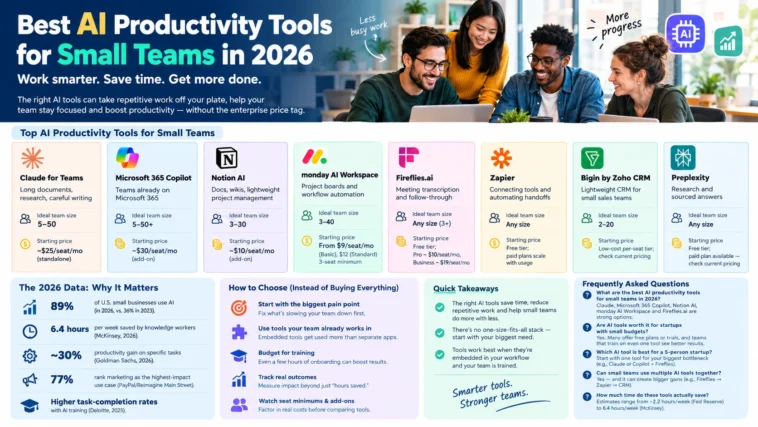
- Adoption has gone mainstream, though the exact number depends on who’s asking. The U.S. Chamber of Commerce’s 2026 Small Business Survey put AI usage among small businesses at 89%, up sharply from 36% in 2023. Other 2025–2026 surveys (Thryv, SBA-linked research) land lower, in the 55–68% range, the gap mostly comes down to whether “using AI” means daily production use or any experimentation at all.
- Time savings are real but vary by source and role. McKinsey’s 2026 Global AI Survey reports knowledge workers using production AI tools recover a median of 6.4 hours per week, with senior practitioners saving more. A more conservative estimate from the Federal Reserve Bank of St. Louis puts average time savings at about 5.4% of work hours, roughly 2.2 hours in a 40-hour week. Both are credible; they’re simply measuring different populations (heavy AI users vs. the broader workforce).
- Productivity gains tend to be task-specific, not company-wide. Goldman Sachs’ 2026 small business research found a median productivity gain of around 30% on specific, localized tasks, while cautioning there’s no clear evidence yet of AI moving the needle on economy-wide productivity. In practice: AI buys back hours on individual tasks; it isn’t a guaranteed company-wide multiplier.
- Marketing is the leading use case. A PayPal/Reimagine Main Street survey of nearly 1,000 small businesses found 77% rank marketing and customer engagement as the highest-impact area for AI, ahead of operations, finance, or HR.
- Training makes a measurable difference. Deloitte’s 2025 research associated a few hours of employee AI training with meaningfully higher task-completion rates compared to teams that deployed AI with no training at all.
- Tools that live where people already work tend to get used more. This shows up consistently across workplace research, though the exact multiplier varies by study and shouldn’t be quoted as a fixed industry number. The practical implication holds either way: a tool bolted onto a separate tab competes with your team’s existing habits, while one embedded in Slack, Outlook, or Notion doesn’t have to.
The takeaway: the tools matter, but so does where they live and how well your team is onboarded. With that context, here’s the 2026 lineup.
Best AI Productivity Tools for Small Teams in 2026
Pricing below is billed annually per seat unless noted, current as of publication — always confirm on the vendor’s pricing page before buying, since AI tool pricing changes frequently.
| Tool | Best for | Ideal team size | Starting price |
| Claude for Teams | Long documents, research, careful writing | 5–50 | ~$25/seat/mo (standalone) |
| Microsoft 365 Copilot | Teams already on Microsoft 365 | 5–50+ | ~$30/seat/mo (add-on) |
| Notion AI | Docs, wikis, lightweight project management | 3–30 | ~$10/seat/mo (add-on) |
| monday AI Workspace | Project boards and workflow automation | 3–40 | From $9/seat/mo (Basic), $12 (Standard), 3-seat minimum |
| Fireflies.ai | Meeting transcription and follow-through | Any size, strongest for 3+ | Free tier; Pro ~$10/seat/mo, Business ~$19/seat/mo |
| Zapier | Connecting tools and automating handoffs | Any size | Free tier; paid plans scale with usage — check current pricing |
| Bigin by Zoho CRM | Lightweight CRM for small sales teams | 2–20 | Low-cost per-seat tier; check current pricing |
| Perplexity | Research and sourced answers | Any size | Free tier; paid plan available — check current pricing |
1. Claude for Teams — Best for document-heavy, careful work
If your team lives in proposals, contracts, financial summaries, or long research documents, Claude is a strong pick among AI tools for startups and small teams that need accuracy over flash. It’s particularly capable with long-document reasoning and careful business writing, and pairs well as a second layer alongside an embedded tool like Notion AI or Copilot. Ideal for: teams of 5–50 doing document-heavy or research-heavy work.
2. Microsoft 365 Copilot — Best for Microsoft-native teams
If your team already lives in Outlook, Word, Excel, and Teams, Copilot slots in without forcing anyone to change habits. It’s particularly strong for meeting summaries and spreadsheet analysis. Ideal for: teams already standardized on Microsoft 365, from 5 people to well past 50.
3. Notion AI — Best all-in-one workspace for lean teams
For teams that already run their docs, wikis, and light project management out of Notion, Notion AI adds drafting, summarizing, and Q&A directly inside the workspace, no extra tab, no extra login. Ideal for: small, lean teams (3–30 people) that want one tool to do several jobs.
4. Monday AI Workspace — Best for automating routine team tasks
monday.com’s AI layer is built for teams that want their project boards to update themselves, auto-assigning tasks, flagging bottlenecks, and summarizing project status without someone manually compiling an update. Note that paid plans carry a 3-seat minimum, so solo users pay for unused seats. Ideal for: teams of 3–40 running structured project workflows.
5. Fireflies.ai, Best for meeting transcription and follow-through
Fireflies joins your calls, transcribes them, and pulls out action items automatically. For small teams drowning in “wait, who owns that?” after every call, this alone can save hours a week. The free tier is genuinely usable for light meeting volume; CRM sync and unlimited storage require a paid seat. Ideal for: any team with regular external or cross-functional calls.
6. Zapier (with AI actions) — Best for connecting your whole stack
The biggest productivity wins rarely come from one tool — they come from tools talking to each other. Zapier’s AI-powered automations let you, for example, have a call transcribed by Fireflies, a follow-up email drafted automatically, and the interaction logged to your CRM — with no manual copy-pasting. Ideal for: teams running three or more tools that need to talk to each other.
7. Bigin by Zoho CRM — Best lightweight CRM with AI-assisted pipelines
Built specifically for small teams rather than scaled-down enterprise software, Bigin offers customizable pipelines, workflow automation for follow-ups, and enough AI assistance to keep a small sales process moving without a dedicated ops hire. Ideal for: small sales teams (2–20 people) that find full CRMs like Salesforce overkill.
8. Perplexity — Best for research and market scans
When your team needs sourced, verifiable answers instead of a plausible-sounding paragraph, Perplexity is a strong choice among AI productivity apps for research-heavy tasks — market scans, competitor checks, and fact verification. Ideal for: any team doing regular market or competitive research, regardless of size.
How to Actually Choose (Instead of Buying Everything)
The research is fairly consistent on one point: teams that pick one AI tool per workflow and train their people on it tend to outperform teams that bolt on five tools and hope. A few principles worth following:
- Start with where the pain is loudest. If meetings are the bottleneck, start with Fireflies — not a full platform overhaul.
- Prioritize tools embedded where your team already works. A tool that lives inside Slack, Outlook, or Notion competes less with existing habits than one sitting in a separate tab.
- Budget for training, not just licenses. A few hours of onboarding appears to produce outsized returns, per the Deloitte research above.
- Track downstream results, not just time saved. Are proposals winning more often? Are response times faster? Are fewer errors slipping through? That’s the real measure of ROI, not just “hours saved” on paper.
- Watch seat minimums and add-on pricing. Several tools on this list (monday, Copilot) either require minimum seat counts or are priced as add-ons to an existing subscription, factor that into the real per-person cost before comparing tools side by side.
FAQs
Claude for Teams, Microsoft 365 Copilot, Notion AI, monday AI Workspace, and Fireflies.ai are strong options for small teams, depending on whether the priority is document work, project management, or meetings.
Several tools on this list offer usable free plans or trials, though team-level features and higher usage limits typically require a paid tier. Research suggests small businesses that train their teams on even one AI tool see better task-completion outcomes than those that don’t — so the return is often worth the cost even on a lean budget.
For a team that size, it’s usually better to start with one tool matched to the biggest bottleneck rather than a full stack. A common combination is a document/writing assistant (Claude or Copilot, depending on your existing software) plus a meeting tool like Fireflies — both have usable entry-level pricing for a handful of seats.
Yes, and it’s often where the biggest gains show up — for example, a meeting is transcribed by Fireflies, a follow-up is drafted automatically, and the result is logged to a CRM via Zapier, without manual copy-pasting. The tradeoff is more subscriptions to manage, so it’s worth adding tools one at a time rather than all at once.
Estimates vary meaningfully by study and by how heavily someone uses AI. More conservative population-level research (Federal Reserve) puts it around 2.2 hours a week; McKinsey’s 2026 survey of workers using production AI tools found a median of 6.4 hours a week, with senior staff saving more. Expect your team’s results to land somewhere in that range depending on usage.